
Appearance
Deliveries
The Deliveries page shows, for every platform, how many open orders are on track, due today and late, and how often the warehouse delivers on time. Whether an order is late comes from Odoo: the Delivery Date on the sale order decides, which Odoo sets from each platform's lead time. Open it with Deliveries in the sidebar, just below Orders.
Switched on per environment
The page exists only where the technical team has switched it on. Until then Deliveries is not in the sidebar, and its address shows Page not found.
The platforms are Odoo's channels, so the page also covers platforms Stock Sync does not import, such as Showroomprivé and Miinto, and every ABOUT YOU shop counts under About You. Stock Sync reads Odoo every 5 minutes and never changes a Delivery Date: if one is wrong, correct it in Odoo, and the page follows.
The page at a glance
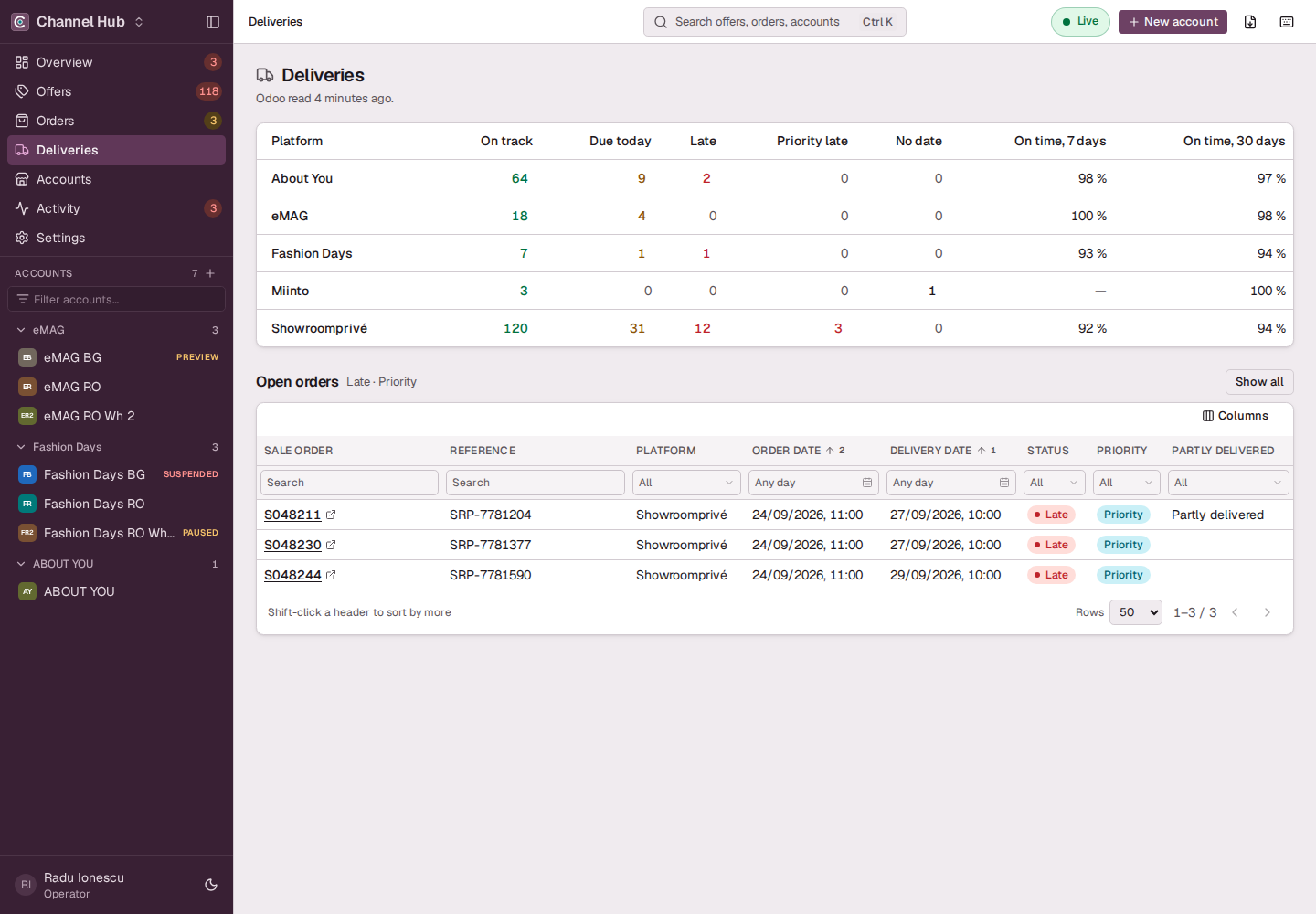
From top to bottom:
- Deliveries, and when Stock Sync last read Odoo (Odoo read 4 minutes ago.). The line turns amber when that was more than 30 minutes ago and adds Until Odoo is read again, an order delivered since may still show as late. Before the first read it says Odoo not read yet.
- The table of platforms, one row each.
- Open orders: the orders behind the number you clicked, or every open order.
The platforms table
| Column | Counts |
|---|---|
| Platform | Odoo's channel |
| On track | open orders whose Delivery Date is after today |
| Due today | open orders whose Delivery Date is today |
| Late | open orders whose Delivery Date has passed |
| Priority late | the late orders Odoo marks as priority (Use Channel Priority Lead Time) |
| No date | open orders without a Delivery Date in Odoo |
| On time, 7 days | of the orders due in the last 7 days up to yesterday, the share delivered by their date |
| On time, 30 days | the same over the last 30 days |
An order is open while one of its deliveries to the customer (Odoo's Delivery Orders) is neither validated nor cancelled. It stops being counted the moment its last delivery is validated in Odoo.
Days are calendar days in Romanian time: an order due on Wednesday is Due today all of Wednesday, whatever time Odoo shows, and Late from midnight.
How on-time is counted: the orders due in the period, up to yesterday, that were not cancelled. An order is on time when its delivery was validated by its Delivery Date (for an order delivered in parts, by the last part). An order past its date and still not delivered counts as late. Orders due today are not counted yet, nor orders without a date. A dash means no order was due in the period.
A platform with nothing but orders without a date (Telegram, say) is not shown.
A platform renamed in Odoo shows under both names for a while: its open orders move to the new name as Stock Sync reads them again (within about 6 hours), and its On time figures keep the old name for the orders due under it, up to 30 days.
Click any number to list those orders below; a 0 cannot be clicked. The number you clicked stays outlined. The address keeps what you clicked, so a link to it opens the same list; the morning message in Teams links to the late orders this way.
Open orders
The list shows the open orders, most urgent first: the earliest Delivery Date at the top. Beside Open orders, what you clicked (for example Showroomprivé · Late); Show all lists every open order again. With nothing open, the list says No open orders: every order in Odoo is delivered.
| Column | Shows |
|---|---|
| Sale order | Odoo's sale order, which opens in Odoo. When Stock Sync imported the order, a second link opens it in Stock Sync. |
| Reference | the platform's order reference |
| Platform | Odoo's channel |
| Order date | when the order was placed |
| Delivery Date | Odoo's Delivery Date, day and time in Romanian time |
| Status | On track (green), Due today (amber), Late (red) or No date (grey): always the word, never the colour alone |
| Priority | Priority when Odoo marks the order as priority |
| Partly delivered | Partly delivered when one delivery is validated and another is still open |
As on the other lists, each column has a filter under its title and sorts with a click on its title (see Working with tables).