
Appearance
Book a FedEx pickup for a return
When a customer sends a parcel back, you no longer type their address into the FedEx website. You book the FedEx courier from the return transfer in Odoo. You only choose a date and a time window. Channel Hub takes the address, the contact, the number of parcels and the weight from Odoo, asks FedEx for the pickup, and writes a note in the return's chatter.
Before you begin
Who can do this: an Operator. A viewer sees the pickups, the FedEx pickup column and the summary on the sale order, but has no buttons.
Which returns: a return transfer (WH/RT/…) of any sale order in Odoo whose delivery method is FedEx: an order that came through Channel Hub, or one made in Odoo some other way (for example the Showroomprivé orders entered in Odoo). Odoo sets FedEx on the return when the return label is printed, or takes it from the original delivery. The label need not exist yet. A cancelled return gets no pickup. A return that is not sent back by FedEx shows no pickup part.
An order Channel Hub does not know: on its return, the Channel Hub part shows only the FedEx pickups card, with the same buttons as below, and no order line, documents or checklist. This needs the companion 0.14.2 or later; an older companion shows nothing on such a return. Its pickups appear in the FedEx pickup column, but not on the sale order.
You need: the companion installed and signed in, and the FedEx connection saved in Settings. The team switches this feature on for everyone. Until then, nothing described here appears.
Time needed: about a minute.
Book a pickup
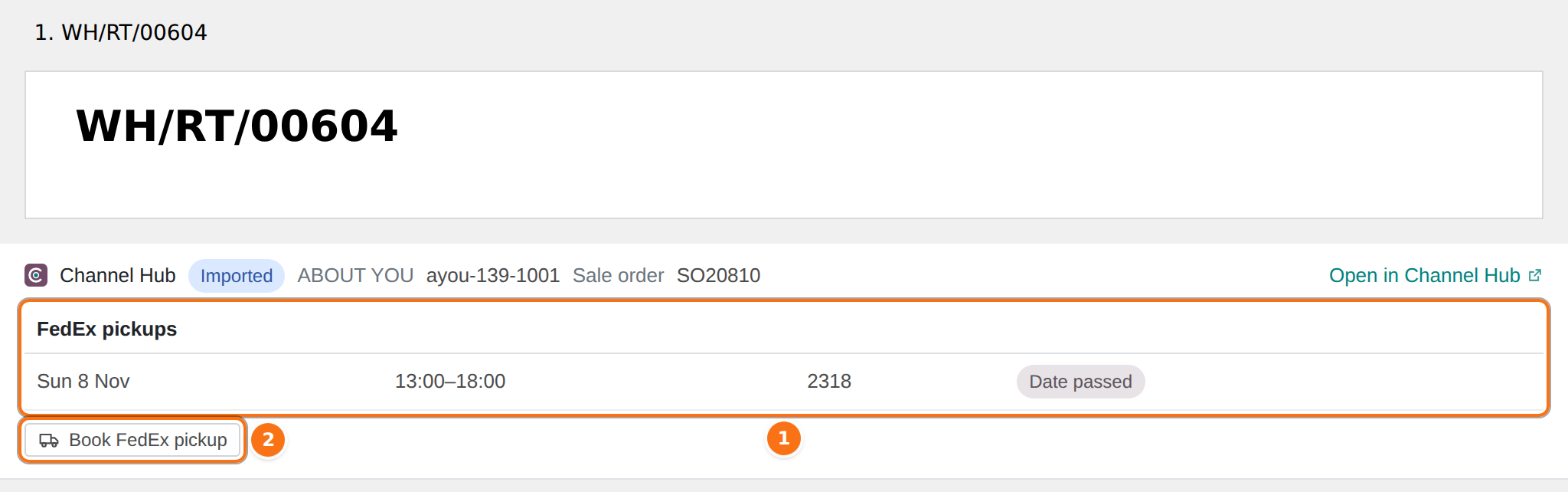
In Odoo, open the return transfer (WH/RT/…), from the sale order or from Inventory → Transfers. The Channel Hub card shows the pickups booked so far for this return, newest first, and the button Book FedEx pickup.
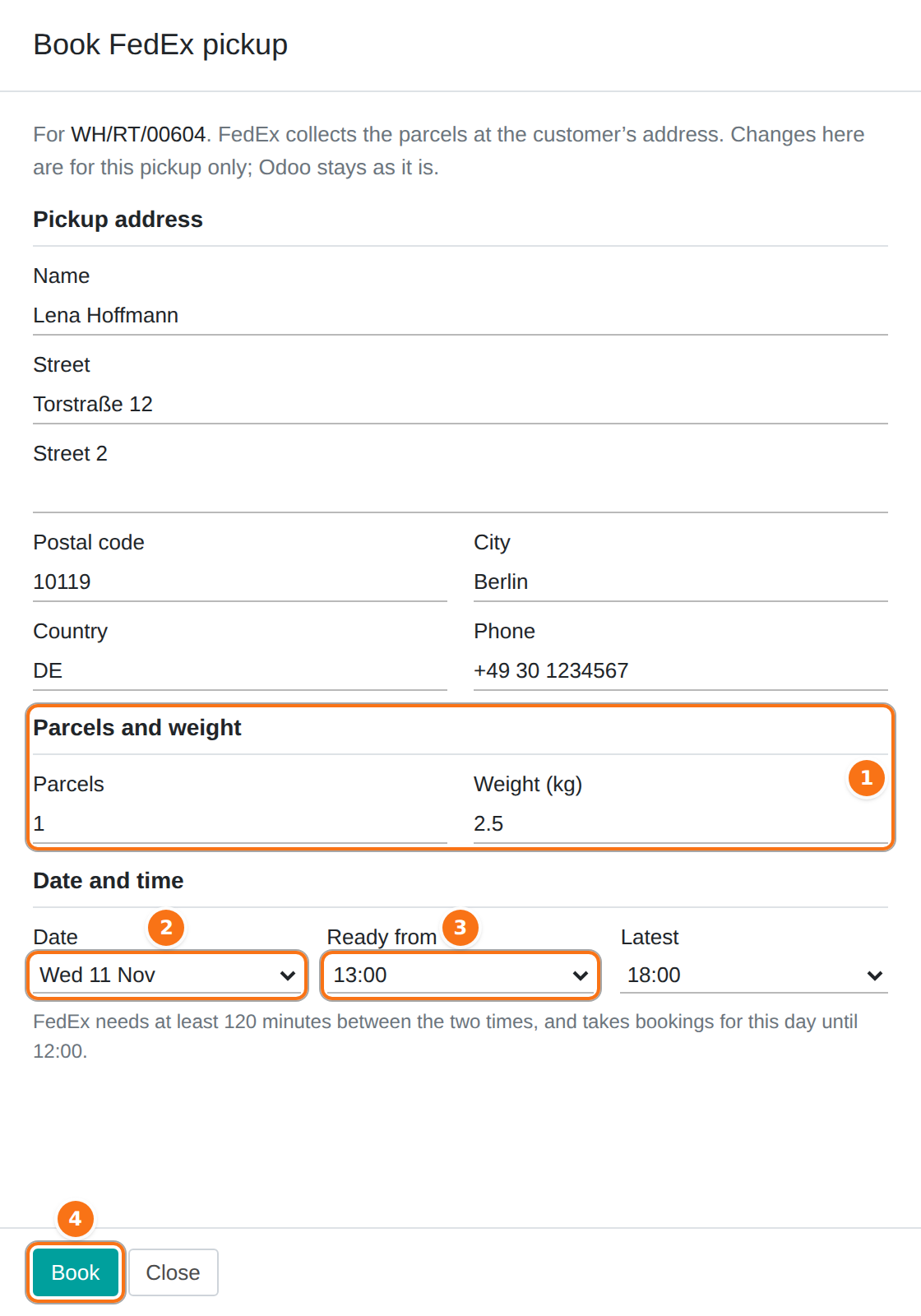
Click Book FedEx pickup. A small window opens. It is already filled in:
- the pickup address and contact: the customer who sends the parcel back, from the return transfer, or from the sale order's delivery address when the return has none;
- the parcels and the total weight, from the return's packages in Odoo (the original delivery's packages when the return has none).
Check the address and the phone. You may correct them for this pickup only: the customer may have told you another place or number. Nothing is written back to Odoo. The courier calls the phone number, so it must be real.
Check the parcels and the weight. Older returns often have no package in Odoo, so the weight may be empty: type it. It must be more than zero.
Choose the date. The window lists only the days FedEx offers for this address. Then choose the earliest time (ready) and the latest time. The times FedEx offers are already chosen. A window that is too short for the courier is refused in the window.
Click Book. It takes a few seconds.
The window says Pickup booked. The note goes into Odoo from the Channel Hub card. Click Close. The Channel Hub card lists the pickup with its date, window and FedEx confirmation, and the return's chatter in Odoo gets a note such as FedEx pickup booked for Wed 12 Nov, 13:00–18:00 at …
Click Book only once. If you click twice, Channel Hub still books one pickup.
What the card shows
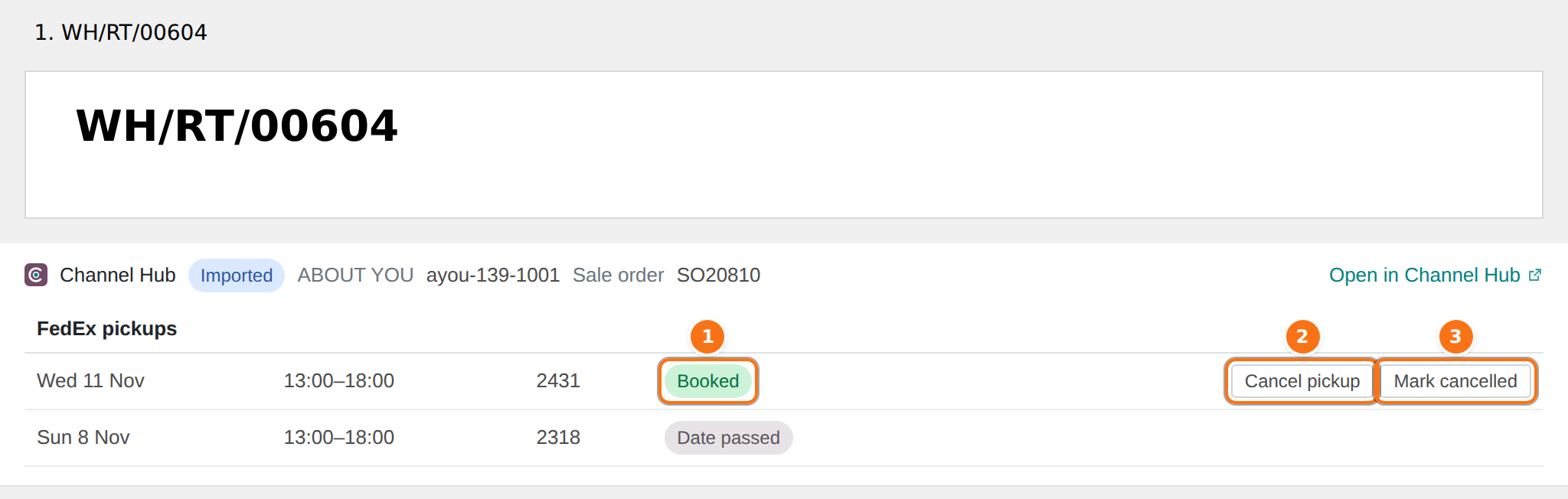
Each pickup on the card has a state:
| State | What it means |
|---|---|
| Booked | FedEx has the pickup and the day has not passed yet. The card shows Cancel pickup. |
| Date passed | The pickup was booked and its latest time has gone by (by Italian time). If the courier did not come or the customer was out, book again. |
| Cancelled | The pickup was cancelled. |
| Unsure | Channel Hub does not know if FedEx booked it. See When FedEx does not answer. |
While a pickup is Booked and upcoming, the card offers Cancel pickup and no Book FedEx pickup. When it has passed or was cancelled, Book FedEx pickup is back. A return may have as many pickups as it needs, one after the other.
The FedEx pickup column
In Odoo's Inventory → Transfers list, the companion adds a column FedEx pickup, right after Odoo's own FedEx status column. For each return it shows the latest pickup:

- Booked · 12 Nov 13:00–18:00
- Date passed · 12 Nov
- Cancelled
- Unsure
The cell is empty when the transfer has no pickup, or is not a FedEx return. Tracking stays in Odoo's own FedEx status column. The list needs its Reference column visible, otherwise the companion adds no column.
On the sale order
For an order that came through Channel Hub, the order's Channel Hub card lists one line for each return that has a pickup, for example WH/RT/00604 · FedEx pickup booked for 12 Nov 13:00–18:00. The line links to the return transfer. There are no buttons on the sale order: book and cancel on the return.
Cancel a pickup
On the return transfer, click Cancel pickup next to the booked pickup. Channel Hub cancels it with FedEx and writes FedEx pickup … cancelled. in the chatter. Then Book FedEx pickup is back if you want another date. To move a pickup, cancel it, then book.
If FedEx refuses the cancellation, the card shows FedEx's words and the pickup stays Booked.
The pickup was cancelled somewhere else
Sometimes the pickup was cancelled on the FedEx website or by phone. Click Mark cancelled. The card asks Was this pickup cancelled with FedEx? Channel Hub will not tell FedEx. Answer yes only if it is true. The pickup becomes Cancelled, the note says it was marked cancelled, and you can book again.
When FedEx does not answer
When you open the window, Channel Hub asks FedEx which dates it offers. If FedEx does not answer, the window says FedEx did not answer. Try again in a minute. and stays open. Wait a minute and try again.
If the window says Channel Hub did not hear back. Press Book again to see FedEx's answer. after you click Book, click Book again. It is the same booking, never a second courier, and the window then shows what FedEx answered. If it says FedEx has not answered yet., Channel Hub is still waiting for FedEx: close the window, and the card shows the answer in a minute.
If FedEx does not answer after you click Book, Channel Hub cannot know whether the courier was booked. The pickup becomes Unsure. Channel Hub never tries again by itself, so two couriers are never sent. Book FedEx pickup is not offered while a pickup is Unsure. The card says:
FedEx may have booked this pickup. Look on fedex.com for a pickup at this address.
Look on fedex.com, then answer on the card:
- It was not booked. Nothing is there. The pickup is closed as failed and Book FedEx pickup is back.
- It was booked. A pickup is there. The card asks for the confirmation number as fedex.com shows it. The pickup becomes Booked. You can Mark cancelled it later, but Cancel pickup is not offered, because Channel Hub has no FedEx details to cancel it with. Cancel it on fedex.com, then click Mark cancelled.
Not allowed, and why
| The window or card says | What to do |
|---|---|
| Add the customer's phone number | FedEx needs a phone for the courier. Type the customer's number. Channel Hub never invents one. |
| FedEx's own message in the window | FedEx refused the booking (a date it does not offer, an address it cannot find). Correct it and click Book again. |
| FedEx did not answer. Try again in a minute. | This appears when the window opens. Wait a minute and open it again. |
| Channel Hub did not hear back. Press Book again to see FedEx's answer. | Click Book again. It is the same booking, so no second courier is sent. |
Booking is refused when the return already has an upcoming pickup. A cancelled return gets no pickup. A return that is already done in Odoo can still be booked, because returns are often validated long before the courier comes.
The chatter note did not appear
Channel Hub posts the note in Odoo from your browser, as you. If the tab was closed before the note was written, or Odoo refused it, the card shows Post the note again. Click it. The pickup itself is not affected.
What stays manual
- Writing to the customer to ask when they are available.
- Making and printing the return label. Odoo does that.
- Tracking the parcel. Look at Odoo's own FedEx status column.
- Moving a pickup: cancel, then book.
- Rebooking after a missed pickup: you decide, then book again.
What you should see
- On a FedEx return of any sale order, the Channel Hub card with Book FedEx pickup (only the FedEx pickups card when Channel Hub does not know the order), and no such button on other transfers.
- After Book, the pickup on the card, a note in the chatter, and Booked · … in the FedEx pickup column.
- After Cancel pickup, Cancelled on the card and in the column, and a note in the chatter.